
Dashboard
One screen tells you what today is: your coach’s line, today’s workout, your nutrition target and your progress.
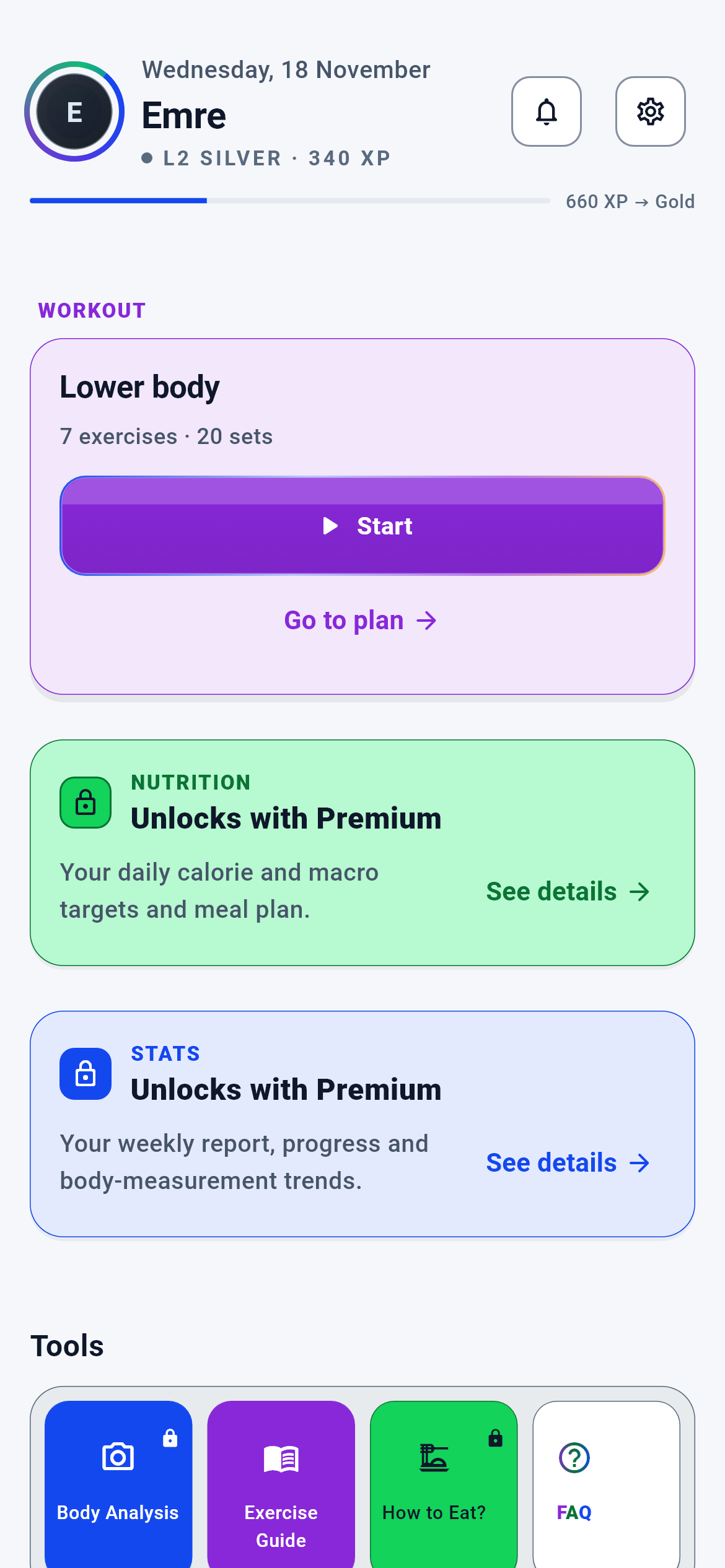
Dashboard — upper half · 1/4
The app’s home screen. After signing in you land here on every launch.
You read what today is and move to the relevant module in one tap — the Dashboard itself is not a working screen but the start of the day.
- The action line on the advice card → its target depends on the advice code (Training plan · Nutrition · Body Form Analysis · Statistics)
- The “Open” button on the training panel → today’s training plan
- Top right: bell → Notifications · gear → Settings · avatar → Profile
What is on this screen 4
You open the app in the morning. Your name and avatar are at the top, with a small grey line underneath: “You joined today”.
That line tells you which day of your DigiFitSphere journey you are on.
The cloud returns only a unit and a number (today / day / month / year); the phone builds the sentence. That way the same fact stays correct when you switch to English. If the cloud sent no first-seen record at all, the line is not drawn — no invented “day 1” is written.
If the line is missing, nothing is wrong: the journey record simply has not formed yet, and the rest of the Dashboard works normally.
The system calls this an “honest empty”.
You expect a thin progress bar right under your name, but sometimes “cannot be shown” appears instead.
The bar is drawn only if an XP snapshot arrived from the cloud.
It used to be that when no data arrived the bar was filled by a fixed ratio derived from the level NAME (Beginner 18%, Intermediate 45%, and so on) and users took it for their real progress — while the number measured nothing. Drawing it at zero is banned too, because zero is also a claim and reads as “I have made no progress at all”.
If you want to see the bar, log at least one session this week; XP derives from your weekly session rows.
The system calls this “fail-closed”.
Below the header there is a purple card headed “ADVICE” with a lightbulb icon: “Every new week is a new start…” and an arrow line underneath.
This is the free user’s coach slot — the deterministic coaching brief.
The coach slot is a SINGLE card on the Dashboard and shows one of two mutually exclusive cards depending on tier: this “ADVICE” card on free, the “Your coach’s advice” card on premium. The two are never drawn together; in the wellness segment the slot is hidden entirely.
Which screen the arrow line takes you to is chosen from the message code the cloud sent, not from the card’s TEXT — so the same tap goes to the same place even if you change the app’s language.
The system calls this a “mutually exclusive slot”.
Under the “TRAINING” heading it reads “Lower A — Quad · 7 movements · 27 sets” with a green “Open” button.
That line is the summary of today’s planned training day: the region name, the movement count and the planned set count.
The numbers are not computed on the Dashboard; they are read from today’s day summary. If completed sets equal or exceed planned sets, the card switches to a “completed” badge — the card works out for itself that you are done.
When you press “Open”, the Dashboard first asks the plan system for today’s plan and opens the workout screen with it once the answer arrives. If the plan cannot be fetched the button SILENTLY does nothing and a log entry is written — not entering is preferred over entering the wrong plan.
The system calls this “plan resolution”.
Behind the scenes — how the system decides 4
When the coach speaks and when it stays silent
One day the purple “ADVICE” card is on the Dashboard; the next day it is gone.
The coach slot decides by four rules, in order.
The order is: (1) if you are in the wellness segment the coach surfaces are off and the slot is hidden; (2) if you have premium access, the “Your coach’s advice” card; (3) if you are free and the cloud returned a visible brief, the “ADVICE” card; (4) if you are free and there is no brief, nothing. The fourth state is deliberately empty: showing a card when there is nothing to say turns the card into noise. The brief itself is no longer produced on the device — the thresholds and advice priority live in the cloud, and so do their inputs. The phone only reports which week it is.
A missing card does not mean something is broken; the system has not yet found an honest sentence to say about you. A week of steady logging brings the card back.
The system calls this a “priority decision chain”.
Where the advice line takes you when you tap it
You tap the line “Keep tracking your measurement trends closely.” and land on the measurement screen.
The destination is chosen from the message code the cloud sent, not from the TEXT on the line.
This decision used to be made by searching for words inside the Turkish sentence on screen. It broke in three places at once: switching the app to English sent the same tap to a different screen; if an editor wrote “exercise” instead of “training” the button silently landed elsewhere; and two keys could never match at all, because Turkish lowercasing does not strip diacritics. Now six message codes map to four destinations: training plan, nutrition centre, body form analysis, statistics. Three codes with ambiguous targets go to statistics.
Even if you change the app’s language, the same advice takes you to the same screen.
The system calls this “code-based routing”.
What the complaint form changes
After Monday’s leg day you submitted “Muscle soreness · severity 2”. What changed by Tuesday morning?
The declaration lands in the cloud as a record and is read from there when your weekly coach commentary is built.
The device relaying the declaration to the coach was switched off; the cloud reads it from its own vault. The reason is simple: if a health declaration affects advice, letting the client write that input leaves the door open — a tampered app could clear its own safety threshold by saying “no complaints”. Opening the form from the Dashboard is deliberate too: the meaning of the declaration is “today’s consequence of what I did yesterday”, and that context lives on the Dashboard.
Set your expectation correctly: the form is not a button that changes your plan on the spot, it is an input to your weekly commentary. If you selected suspected injury, the right step is to see a doctor.
The system calls this “cloud-owned context”.
What happens when you bring the app back from the background
You leave the Dashboard open, switch to WhatsApp and come back ten minutes later.
The Dashboard reloads its live data and the coaching section.
Otherwise numbers from the morning would sit on screen and you would take them for current. The same discipline applies to changing language: when you switch the app’s language, the coaching content is reloaded — for a while that content was resolved and cached in the first language, so it stayed in the old language even when the screen was redrawn.
You do not have to close and reopen the app to refresh the Dashboard; returning from the background is enough.
The system calls this a “lifecycle refresh”.
What your data is for 3
Your completed training sessions
If you provide it A weekly XP snapshot forms and the progress bar in the header is drawn; the coaching brief builds its sentence from session count and tonnage; the 30-day numbers in the statistics card fill.
If you skip it The bar is NOT drawn at all; a “cannot be shown” line appears instead — a bar filled to zero is not shown, because zero is also a claim. The coaching card says “a little more data is needed for clearer advice”.
Your body measurements (waist · hips · neck)
If you provide it The form-analysis readiness row becomes “Ready”, the measurement count and change label in the statistics card fill, and the coaching brief also takes your body trend into account.
If you skip it The readiness row shows how many measurements are missing. If your measurements exceed the freshness window the row switches to “out of date”; how many days that window is, is the cloud’s decision, not the phone’s.
Your recovery complaints (the heart box on the Dashboard)
If you provide it The declaration is recorded in the cloud and read when your weekly coach commentary is built; the note field is stored encrypted.
If you skip it The commentary is built from measurable data alone — the system does not guess at a pain it has no record of.